Finding the right wall mount computer shelf helps free desk space while keeping essential devices organized and within reach. This guide highlights five solid options tailored to different needs, from compact shelves for AV gear to robust mounts for heavier PCs. Perfect for small home offices, media rooms, and hobby spaces, these picks emphasize stability, cable management, and easy access. Buyers will find recommendations for best use cases, plus practical cautions to avoid common setup issues.
Summary at a glance: the following products are selected for varied use cases—compact AV and router storage, wall-mounted PC mounts, adjustable desk-height options, and two-layer projector/entertainment shelves. Usefully, each option notes the best-suited buyer type and why it stands out, along with a practical limitation to consider before buying.
Product Overview at a Glance
- JINGCHENGMEI Metal Floating Wall Mounted Shelf Bracket (12″ Width) — Best for compact AV setups and small projectors.
- VIVO Universal PC Wall Mount — Best for limited floor space with heavier desktop components.
- VIVO Adjustable Deskside PC Wall Mount — Best for close-at-hand PC workstations with flexible width.
- Mount-It! Monitor and Keyboard Wall Mount with CPU Holder — Best for all-in-one wall-mounted workstations with keyboard tray.
- JINGCHENGMEI Universal Computer Wall Mount Bracket (10.7″ H x 7″ W) — Best for space-saving CPU or UPS mounting.
JINGCHENGMEI Metal Floating Wall Shelf (12 Inches)

Best for: small AV setups, WiFi routers, and compact media players. This shelf offers a wide 12″ platform with an 11.8″ by 7.83″ usable area for devices like streaming boxes, game consoles, or tiny projectors. The curved edges improve stability, helping prevent accidental slips during use. An integrated D 1.38″ cable management hole enhances tidiness by guiding cords away from the front.
Why chosen: its size is ideal for media gear without overwhelming a room, and its built-in cable management reduces clutter. The design prioritizes stable storage for light to medium-weight devices and easy access for maintenance. It’s a clear fit for media centers or bedrooms with wall-mounted equipment.
Caution: ensure the mounting surface can support the weight of devices plus the shelf itself, and verify the wall anchors align with your wall type to avoid wobble.
VIVO Universal PC Wall Mount (MOUNT-PC03V)
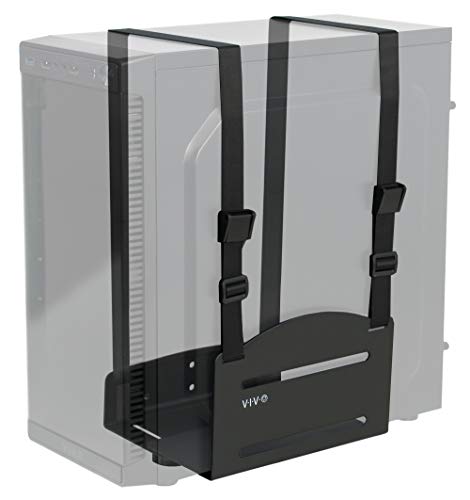
Best for: freeing floor and desk space with a secure wall-mounted PC. This mount uses a sturdy steel construction and adjustable straps to support cases up to 10 kg. By placing the PC on the wall, users gain easy access for maintenance and reduce exposure to dust and vibrations that can affect performance.
Why chosen: it provides reliable hardware support for common desktop towers while preserving valuable workspace. The adjustable design helps accommodate slightly different PC widths, making it versatile for many setups.
Caution: heavier or unusually shaped PCs may require additional mounting options or bracing, and drywall-only installation may limit weight capacity.
VIVO Adjustable Deskside PC Wall Mount (MOUNT-PC07WL)

Best for: compact deskside workstations requiring proximity to the user. This mount supports larger PCs with widths from 7.1″ to 11.8″ and up to 66 lbs on solid surfaces, with a large 2D approach to adjust width. It keeps the PC within arm’s reach while preserving desk space for accessories and documents.
Why chosen: its wider adjustable range helps fit a range of compact to mid-tower PCs, making it a flexible choice for home offices or gaming setups. Padding protects devices from scratches during installation.
Caution: choose this if your wall material can bear the load; drywall installations may limit supported weight and require additional anchoring.
Mount-It! Monitor and Keyboard Wall Mount with CPU Holder (MI-7919)
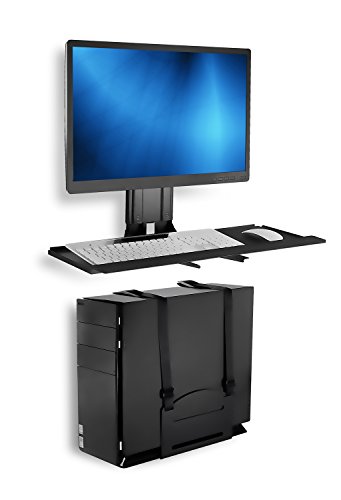
Best for: compact stand-up-style workstations and space-conscious offices. This unit attaches a monitor, keyboard, and a CPU to a wall-mounted platform. The 25-inch wide tray accommodates keyboard and mouse side by side, while the included soft pad helps prevent wear on components.
Why chosen: it consolidates essential peripherals into a single organized wall system, reducing clutter and enabling ergonomic layouts. The included hardware simplifies mounting and keeps the setup tidy after installation.
Caution: ensure the monitor and keyboard are within the configured VESA and weight limits, as a poorly balanced system can create strain on the mount.
JINGCHENGMEI Universal Computer Wall Mount Bracket (10.7″ H x 7″ W x 9.8″ D)
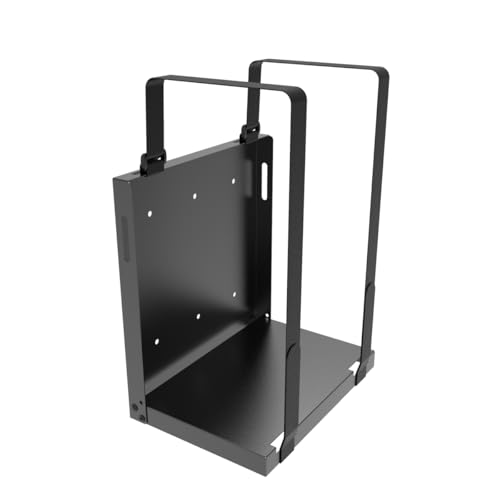
Best for: space-saving CPU or UPS mounting on walls or desk sides. This adjustable mount holds devices up to a compact footprint while freeing desk space and reducing dust exposure. The specified space accommodates CPUs, UPS devices, and other electronics with a 9.8″ depth.
Why chosen: functional for compact offices where keeping devices off desks is crucial. The design supports multiple HP, Dell, Acer, Apple, APC, and other brands, offering cross-compatibility for standard components.
Caution: verify the device depth and mounting space to prevent overhang or interference with other desk items.
Buying Guide: Wall Mount Computer Shelf Systems
- What’s the primary use? Choose a shelf or mount based on whether you need storage, access to ports, or space for a full PC tower.
- Wall type and weight capacity matter. Wood studs and solid concrete provide stronger anchoring; always verify weight limits to avoid failure.
- Ventilation and heat dissipation. For CPUs or AV gear, ensure at least minimal airflow around the device; the design should not trap heat.
- Cable management. Look for integrated cable holes or channels to keep cords organized and out of sight.
- Ease of installation. Some products include mounting hardware and clear instructions; others may require additional parts or tools.
- Adjustability. If you anticipate changing devices, consider adjustable widths or tilting capabilities for easier access.
- Aesthetics and room style. A low-profile shelf blends with most decors, while bold racks may suit entertainment spaces.
FAQ
- Q: Are wall mounts safe for heavy PCs? A: Yes, but check the rated weight and wall material. Use studs or solid masonry anchors when possible.
- Q: Do these mounts work with VESA mounts for monitors? A: Some products include monitor trays compatible with common VESA patterns; verify dimensions before buying.
- Q: Will mounting a CPU on a wall reduce dust exposure? A: It can reduce desk dust exposure, but ensure ventilation to avoid heat buildup.
- Q: Can I install these on drywall alone? A: Drywall-only installations usually require additional reinforcement; prefer mounting on studs or masonry with appropriate anchors.
- Q: Is cable management included? A: Several models provide holes or channels for cables; check product features for specifics.
- Q: Which option is best for a small home office? A: A compact wall shelf for AV gear plus a low-profile CPU mount often works well for tight spaces.