The best rear view desk mirror depends on how you want to mount it and how much of the area behind your workstation you need to see. The ZMJCGLXY and Ampper clip-on mirrors suit buyers who want an adjustable glass mirror; the Nanningo 12-inch-arm model offers a longer reach. The onsogi mirror is a stick-on option, while the smaller Nanningo monitor mirror is designed for thinner edges and compact setups.
| Product | Best For | Mounting |
|---|---|---|
| ZMJCGLXY Clampable Convex Safety Mirror | Flexible positioning | Clip-on |
| Ampper Clip On Security Mirror | Glass and metal construction | Clip-on |
| Nanningo 12 x 3 in Mirror | Longer reach | Clip-on |
| onsogi Wide Angle Mirror | Adhesive-style mounting | Stick-on |
| Nanningo 3.15 in Monitor Mirror | Compact, thinner-edge setups | Clip-on |
ZMJCGLXY Clampable Convex Safety Mirror
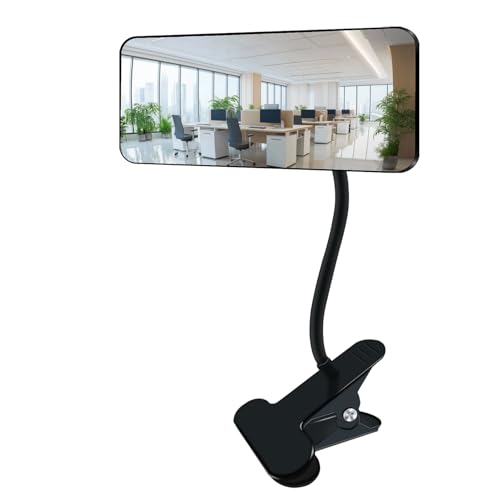
This mirror has a 6.4-by-3-inch glass surface, a 9.84-inch metal stem, and a clip listed as 3 inches wide. Its 360-degree adjustable joint lets users aim the convex reflection toward a doorway, aisle, or other area behind a desk.
Best for: Buyers who want a glass mirror with a long adjustable stem and a padded clamp. The listing describes a sponge pad to help limit scratches and a curved frame designed to avoid sharp edges.
Limitation: The listed clip width is 3 inches, but the maximum supported desk-edge thickness is not specified. Check the dimensions of the mounting surface before choosing it.
Ampper Clip-On Security Mirror

Ampper’s rectangular mirror measures 6.69 by 2.95 inches and uses real HD glass with a frameless design. Its metal stand and joint adjust through 360 degrees. The padded clip is specified for surfaces up to 2 inches thick, including desks, cabinets, cubicles, and PCs.
Best for: Buyers who want a glass convex mirror and a stated maximum mounting thickness. The all-metal stand and sponge mat are useful details for a workstation where the mirror may need repositioning.
Limitation: This model depends on a clamp, so it may not suit a surface that is thicker than 2 inches or lacks an accessible edge.
Nanningo 12-Inch-Arm Cubicle Mirror
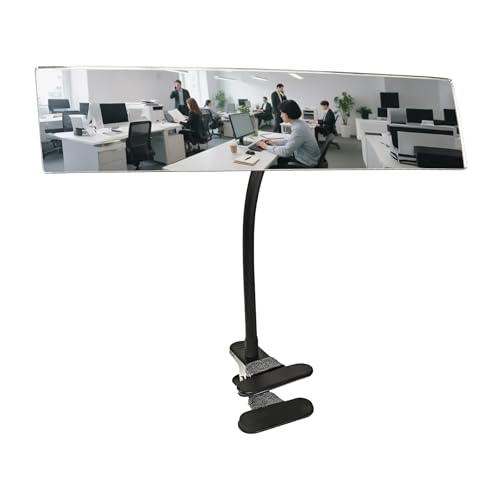
This convex mirror measures 12 by 3 inches and has a 12-inch adjustable metal arm. Its reinforced clip fits edges up to 2 inches thick, and the listing says the arm and swivel joint can be moved up, down, left, or right.
Best for: Buyers who need the mirror to extend farther from a desk edge or cubicle partition. The longer arm may help position the reflection around a monitor or workstation obstruction.
Limitation: Its larger size and extended arm require space. Choose a shorter mirror if the workstation is crowded or a compact profile matters more than reach.
onsogi Stick-On Wide-Angle Mirror

The onsogi mirror uses an acrylic convex surface and two adjustable joints for aiming the view. Its listing presents it as a stick-on mirror for a cubicle, desk, computer monitor, or other workspace location.
Best for: Buyers who prefer an adhesive-style mounting approach instead of a clamp. The two adjustable joints can help direct the reflection toward a chosen blind spot.
Limitation: The provided product details do not state mirror dimensions or a supported surface range. Remove the protective film before use, as the listing specifically calls this out.
Nanningo Compact Monitor Mirror

This round convex mirror measures 3.15 inches and has an acrylic lens described as 3 mm thick. Its clip fits monitors, laptop screens, desks, and cubicle panels up to 0.9 inches thick. The listing says no tools, adhesive, or drilling are needed.
Best for: Buyers seeking a compact, repositionable mirror for a thinner monitor or desk edge. Its smaller round shape takes up less space than the rectangular options.
Limitation: The 0.9-inch maximum edge thickness is narrower than the 2-inch limit listed for some larger clamp-on mirrors.
Buying Guide: How to Choose a Rear View Desk Mirror
Should you choose a clip-on or stick-on mirror?
A clip-on mirror is a practical choice when the desk, monitor, or cubicle has an accessible edge that fits the clamp. It can be repositioned without relying on adhesive. A stick-on design may suit buyers who do not want a clamp, but check the product’s mounting instructions and whether the target surface is appropriate.
What mirror size and arm length do you need?
A larger or longer mirror can be easier to position over a monitor or around a workstation obstruction. The Nanningo 12-by-3-inch model has a 12-inch arm, while the compact Nanningo mirror is 3.15 inches round. Consider available desk space as well as the area you want reflected.
Does glass or acrylic matter?
The listed glass options include models from ZMJCGLXY and Ampper. The onsogi and compact Nanningo options use acrylic, according to their product details. Compare the stated material, dimensions, and mounting method rather than assuming all convex mirrors provide the same view.
How should you check fit and placement?
Measure the edge where you plan to mount the mirror. Compare it with the product’s stated clamp limit: up to 2 inches for the featured Ampper and long-arm Nanningo models, and up to 0.9 inches for the compact Nanningo monitor mirror. Aim the mirror toward the specific doorway, aisle, or area behind you that you want to monitor.
Frequently Asked Questions
What is a rear view desk mirror used for?
It reflects a wider view of activity behind a workstation, such as a doorway, aisle, or nearby cubicle area, so the user can check the surroundings without repeatedly turning around.
Are convex desk mirrors better for seeing behind you?
Convex mirrors are designed to show a wider area than a flat mirror. The trade-off is that reflected objects may appear smaller, so the mirror is best used for general awareness rather than precise detail.
Can a clip-on desk mirror attach to a monitor?
Some can, but fit depends on the monitor edge and the clamp’s stated thickness limit. Check the product specifications and the shape of the edge before mounting.
Do these mirrors require tools?
The compact Nanningo model is described as a no-tools clip-on mirror. Other listed clamp-on models attach with a clip, while the onsogi product is described as stick-on. Follow the instructions supplied with the selected mirror.
How do you position a desk safety mirror?
Secure the mount, then adjust the mirror so it reflects the area you want to see behind or beside the workstation. Recheck the angle from your normal seated position.