The best digital monthly wall calendar depends on how much screen space and household planning you need. The 15-inch Skylight is best for families who want a large shared display, while the Yemsd model combines a larger screen with chores and meal planning. The 10.1-inch options are better for compact spaces; Airzeen stands out for dashboard customization, and the other models emphasize meals, lists, or photo features. Compare the screen size, calendar syncing, and extras before choosing.
| Product | Best For | Screen | Notable Features |
|---|---|---|---|
| Yemsd Digital Calendar | Family command center | 15.6 inches | Schedules, meals, chores, photos |
| 10.1-Inch Wall Plan Calendar | Meals and family photos | 10.1 inches | Calendar sync, chores, lists |
| Skylight Calendar | Large, readable display | 15.4 inches | Touchscreen and broad calendar syncing |
| 10.1-Inch Smart Electronic Organizer | Meal and grocery planning | 10.1 inches | Meal manager, chores, lists |
| Airzeen Digital Wall Calendar | Customizable dashboards | 10.1 inches | Widgets, reminders, rewards |
Yemsd 15.6-Inch Digital Calendar
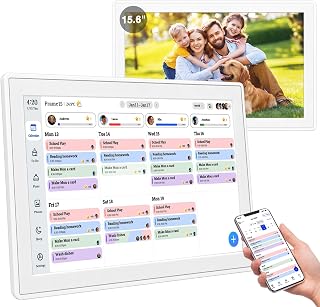
The Yemsd digital calendar is best for families looking for a larger-screen command center that combines scheduling with household routines. Its listed features include calendar syncing, meal planning, a chore chart, and photo-frame functionality. The product description names Google, Outlook, and iCloud among the supported calendar platforms and says multiple family members can edit schedules.
Choose this model if chores and meal planning matter as much as monthly scheduling. The built-in reward system lets parents assign tasks and children earn points for completed chores. A limitation to note: the product listing says batteries are not included, so check the setup requirements before purchase.
10.1-Inch Wall Plan Touch Calendar

This 10.1-inch calendar is best for households that want scheduling plus practical meal and grocery organization in a compact display. Its features include syncing with Google, iCloud, and Outlook, uploading photos for a slideshow, assigning chores, and tracking rewards. Meal plans and shopping lists can also sync with the family.
Choose it if you want a calendar that supports weekly meal preparation and shared lists alongside appointments. Its smaller screen is better suited to a compact wall or counter location than to a household that needs a large schedule visible across a room. The listing describes app and touchscreen task management, but does not specify additional display dimensions or mounting details.
Skylight 15-Inch Touchscreen Calendar

The Skylight Calendar is best for families who prioritize a large shared schedule and flexible placement. The 15.4-inch touchscreen syncs with Google, iCloud, Outlook, Cozi, and Yahoo, according to its listing. It supports color-coded events and an interactive chore chart, with schedule updates available on the device or through the app.
Choose this model if you want a sizeable display that can be mounted on a wall or placed on a countertop, hallway table, or desk. Its broader list of named calendar services may suit households using different platforms. The listing specifies Wi-Fi setup, so it is not the right choice if you need a calendar that works without a Wi-Fi connection.
10.1-Inch Smart Electronic Wall Organizer

This 10.1-inch organizer is best for families who want meal and grocery planning integrated with a shared calendar. Its listed features include real-time Google Calendar, iCloud, and Outlook syncing, chore tracking, reward stars, weekly meal planning, recipe uploads, and automatic grocery-list creation. The product listing says the features are available without a subscription.
Choose it if coordinating dinner plans and shopping is a central reason for buying a digital calendar. The chore feature adds task assignment and progress tracking for children. Its 10.1-inch screen is a compact option, but families seeking a larger at-a-glance display may prefer one of the 15-inch models.
Airzeen 10.1-Inch Digital Wall Calendar

Airzeen is best for buyers who want to arrange a calendar dashboard around their household’s priorities. Its listed widgets include calendars, tasks, rewards, lists, meal plans, weather forecasts, and photos. It also supports color-coded schedules, family avatars, reminders, chore tracking, and syncing with Google Calendar, iCloud, and Outlook.
Choose this model if customization is more important than having a large screen. The listing says core features do not require monthly fees or premium subscriptions. Its 10.1-inch display may be less suitable for households that want a large-format calendar that is easy to read from across a room.
Buying Guide: How to Choose a Digital Monthly Wall Calendar
How large should the display be?
Screen size affects how much information can be viewed comfortably at once. The 15.4- and 15.6-inch options are better for central family spaces where several people need to check the schedule. A 10.1-inch model may suit a smaller wall, kitchen counter, or desk, but consider how close viewers will be when reading events.
Which calendar services should it sync with?
Check that the device names the calendar services your household already uses. The products listed here specify different combinations of Google, iCloud, Outlook, Cozi, or Yahoo. If multiple family members use different platforms, confirm that each relevant service is supported before buying.
Do chores, meals, or photos matter most?
Compare the extras against your routine. Chore charts and reward systems can help keep household tasks visible. Meal plans and grocery lists support shopping and dinner coordination. Photo slideshows or photo widgets add a separate display function. Not every model lists every feature, so use the product details to match the device to your priorities.
What should you check before mounting?
Review the listed screen size, placement options, and setup requirements. The Skylight listing specifies wall or tabletop placement and Wi-Fi setup. For other models, check the full product details for mounting and connectivity information. Also confirm whether any accessories or batteries are needed.
Frequently Asked Questions
What is a digital monthly wall calendar?
It is an electronic display for shared schedules and calendar events. Some models also add chores, meal plans, shopping lists, photos, or reminders.
Can family members update these calendars?
Several listings describe schedule syncing and updates through an app, the device, or multiple family members. Check each product’s details for its specific update options.
Do these digital calendars require a subscription?
Some listings explicitly say there are no monthly fees or subscriptions, including the Yemsd, 10.1-inch organizer, and Airzeen models. Confirm current terms and included features in the product details.
Which screen size is better for a shared family space?
A 15-inch model provides a larger display for at-a-glance viewing. A 10.1-inch calendar takes up less space and may suit a smaller room or countertop.
Can a digital wall calendar also track chores?
Yes. All five products list chore or task features, and several include points, stars, or rewards for completed tasks.