Answering the common buyer question: which cable box wall mount behind the TV best fits a compact, tidy entertainment setup? This guide highlights five strong options, each chosen for behind-TV installation, adjustability, and easy mounting. It helps you decide who benefits most from each model—whether you want a slim profile, versatile mounting options, or easy DIY installation. A quick summary table follows to compare key points at a glance.
| Product | Best For | Key Range | Install Type |
|---|---|---|---|
| woiron Cable Box Wall Mount | Minimalist setups behind fixed TVs | Height up to 10″, Length 3.5″-10″, Depth 1.85″-2.99″ | Wall or behind TV |
| Mount Plus MP-06-02 | Cable boxes and media players with varied sizes | Height up to 10″, Length 3.5″-10″, Depth 38-67 mm | Drywall screws included |
| Beiyier Cable Box Mount | Devices with 3.5″-10″ height range | Depth 1.73″-2.95″, custom 75/100 mm VESA | Wall or behind TV |
| appacare Cable Box Mount | Quick installs for neat behind-TV setups | Height up to 10″, Length 3.5″-10″, Depth 1.85″-2.99″ | Wall or behind TV |
| Monzlteck Adjustable Small Device Holder | Compact media players and routers | Supports devices less than 1.77″ thick | Wall or back of TV (adhesive or screws) |
woiron Cable Box Wall Mount
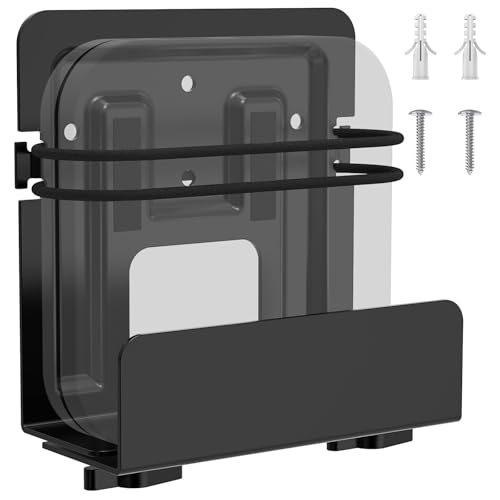
Function: This wall mount hides wires and boxes for a neat TV setup, especially useful behind a fixed TV. It features adjustable vertical dimensions to fit devices up to 10 inches high, with a depth range of 1.85″ to 2.99″. Best for buyers who want a simple, sturdy solution that blends behind a mounted screen. A simple nuts-tighten installation is included for quick mounting. Limitation: compatible depth varies by device; verify your unit’s height and depth before purchasing.
Mount Plus MP-06-02 Cable Box Mount
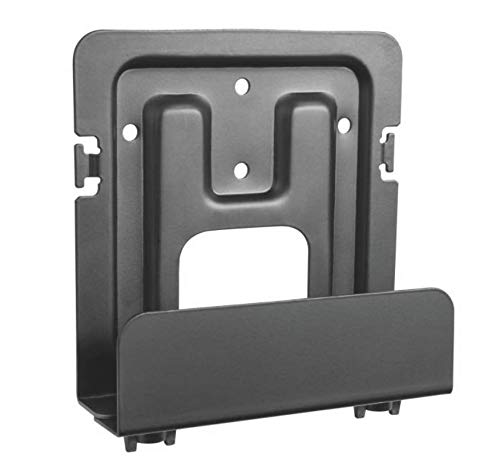
Features: This adjustable wall mount supports devices up to 10″ tall with a vertical length of 3.5″-10″ and depth from 38 mm to 67 mm. It includes drywall screws and anchors for quick installation. Best for users who want a versatile, easy-to-secure solution that hides cables behind a TV. Choose this if you need reliable mounting hardware and a tight fit for a range of devices. Caution: ensure your TV wall has enough clearance behind the mount for venting and cable routing.
Beiyier Cable Box Mount

Best for: devices within 3.5″ to 10″ height and 1.73″ to 2.95″ depth. The mount works behind the TV or on the wall and offers multiple installation options, including 75 mm or 100 mm VESA patterns. It features open side holes to avoid blocking remote signals and supports bottom cable threading for airflow. Limitation: ensure your device’s width fits the mounting footprint.
appacare Adjustable Wall Mount

Designed for 3.5″-10″ height devices with a 1.85″-2.99″ depth. It can be installed on a wall or behind a TV, making it suitable for cramped entertainment setups. The bracket tightens easily after mounting, aiding quick, stable placement. Best for apartments or rooms with limited space where a low-profile solution is essential. Caution: verify the device depth to ensure a clean flush finish behind the TV.
Monzlteck Adjustable Small Device Holder

Best for compact devices under 1.77″ thick, such as certain Apple TVs, Roku boxes, routers, and streaming devices. It supports wall mounting or mounting behind the TV, using adhesive or screws. The dual installation options provide flexibility for tighter spaces. Limitation: thicker devices may not fit this mount; check device thickness before purchase.
Buying Guide: Key Considerations For Behind-The-TV Mounts
- Device dimensions: Measure height, width, and depth; choose a mount with clear clearance for heat and airflow.
- Installation method: Decide between wall-mounted or behind-TV mounting; check for included hardware and wall type compatibility (drywall, studs).
- Cable management: Look for features that hide cables while allowing easy access to ports on the back of your devices.
- Remote control accessibility: Ensure the mount design does not block IR receivers or hinder remote signals.
- Heat and ventilation: Prefer mounts with open sides or bottom clearance to prevent overheating of devices.
- Future-proofing: If you anticipate device changes, pick an adjustable mount with a larger range.
Frequently Asked Questions
- Q: Do these mounts work behind all TV brands? A: Most are universal for devices under the specified height and depth; confirm compatibility with your TV’s wall or back-space.
- Q: Can I install behind a curved TV? A: Some mounts offer flexible adjustment, but verify clearance and mounting surface suitability for curved screens.
- Q: Will the remote still work if the device is behind the TV? A: Choose mounts with open slots or side access to prevent remote signal obstruction.
- Q: Do I need professional installation? A: For drywall mounting, consider anchors and screws provided; for beginners, simple DIY installation is usually sufficient.
- Q: Is airflow affected by mounting behind the TV? A: Proper gap around sides and bottom typically maintains airflow; avoid crushing vents.
- Q: Can I mount above a soundbar? A: If space allows and the device aligns with mounting clearances, behind-the-TV placement is feasible.